
nullGuard - Self-hosted WireGuard management because you shouldn't trust anyone else with your VPN

The internet is getting weird. By weird, I mean systematically worse by design.
The UK is moving to restrict VPN use for children under its Online Safety Act framework - but the legislation is written so broadly that businesses relying on VPNs for basic remote access are caught in the blast radius too. Wisconsin pushed a bill to the Senate floor that would effectively block VPN users from visiting certain websites - as a byproduct of age verification enforcement that technically cannot work against a VPN and everyone involved knows it. Russia is fining Google tens of millions of rubles for promoting VPN apps on the Play Store. And you bet the EU is also up for it - just give them time to make the most dystopian laws up.
And then there's freedom.gov - a US government project, apparently run out of CISA, built to let people in other countries route their traffic through US infrastructure and access the "free and open internet." The pitch is that it circumvents censorship. The reality is that you'd be handing every packet you send to a government entity. I really like the general idea, but doesn't this entirely defeat one of the primary purposes of using a VPN in the first place? I wouldn't mind using a tool like that in principle, but unless they prove they're not tracking you (as if 😆) there is no version of that where you come out ahead.
The EFF put it plainly: lawmakers want to ban VPNs and they have no idea what they're doing. The technical argument is simple - you cannot tell if a VPN connection is coming from Milwaukee or Mumbai. Platforms would have to block all VPN users globally to comply with a state-level law, or just ignore it. The harm falls on remote workers, abuse survivors hiding from abusers, journalists, researchers, and anyone else who has a legitimate reason to use one - which is most people. Forget about your region-locked Netflix show or gaming server. The upside is... unclear?
So here we are. Governments are making noise about restricting the tools people use to keep their traffic private, while simultaneously building their own VPN infrastructure that you should absolutely not trust.
First: Two Very Different Things Called "VPN"
Before anything else - and this matters - a "VPN" can mean two fundamentally different things depending on what you're actually trying to do.
Home or work network VPN. You run WireGuard on a server at home (or on your router). Your devices connect to it when you're out, and your traffic routes back through your home. You can access everything on your home network remotely - your Plex server, your NAS, your self-hosted stuff - as if you were sitting on your couch. The limitation here is that your ISP needs to give you a reachable static IP address. If you have a static IP, great. If not, a dynamic DNS service handles it (usually). Either way, this is about remote access to your own network - not about hiding from your ISP, because your ISP is exactly who's providing the connection.
Exit node VPN via a VPS. You spin up a cheap cloud server somewhere - $4/month at Contabo, Hetzner, Vultr, DigitalOcean, Linode, whatever - run WireGuard on it, and point your devices at it. Now all your traffic exits through that server's IP. Your ISP sees an encrypted tunnel to a VPS and nothing else. The VPS provider sees your traffic, but you can pick one in a different jurisdiction and you're not sharing infrastructure with thousands of other people the way you are with a commercial provider. This is the privacy and ISP-bypass use case.
Both are valid scenarios. They just solve different problems.
nullGuard works for both - but it's worth knowing which one you actually need before you start.
The Commercial VPN Problem
Let's say you've decided not to connect through freedom.gov, but also using a commercial VPN provider isn't the obvious answer it looks like.
You're still trusting someone with your traffic. The difference between routing through an ISP and routing through a VPN provider is mostly about which entity sees your data. Some providers are better than others - Mullvad, for example, has been raided by authorities and produced nothing, because they genuinely have nothing to produce. Awesome. But most VPN providers are not Mullvad or Proton and you cannot verify any of their claims about logging.
And you're paying for that trust - monthly, indefinitely, for a service where the entire value proposition is "trust me bro." 🧢
If you're going to pay for a server either way (and with the VPS approach, you will be), you might as well pay for something where you control what gets logged.
Self-hosting your own WireGuard server solves both problems. You know what's logged because you control the server. You pay for compute, not for privacy promises. And WireGuard itself is fast, modern, and has a clean auditable codebase - if you're into such things, it was specifically designed to be the kind of thing you can read in an afternoon.
Why WireGuard Specifically?
It's worth being clear about why WireGuard rather than just OpenVPN.
OpenVPN has been the default self-hosted choice for a long time, and it has real strengths - username/password authentication, certificate authorities, per-user revocation, LDAP integration. But that flexibility comes at a cost. OpenVPN runs in userspace, which is meaningfully slower, and has a codebase orders of magnitude larger than WireGuard's.
WireGuard lives in the kernel, uses modern fixed cryptography with no cipher negotiation, and benchmarks substantially faster in nearly every comparison. What it gives up is the authentication layer. There's no username/password, no certificate hierarchy - just cryptographic key pairs. For personal use or a small team, that's fine. You generate a key pair per device, distribute the config once, and if you need to revoke access you remove the peer. For an enterprise environment that needs directory integration and user-level auth, OpenVPN or a dedicated solution is still the right answer. For everything else, WireGuard.
Why Nobody Has Done This Until Now (Well, Not Exactly Like This 🤷)
Here's where it gets actually frustrating.
WireGuard has existed since 2018 and has been in the Linux kernel since 5.6. It is objectively a better VPN protocol than most of what came before it. And yet if you want to run your own server and hand configs out to a few devices, you're sitting in a terminal generating key pairs manually, editing config files by hand, figuring out which IP addresses you assigned to which device, and then doing all of it again when you add a new client.
There are a few UI projects out there. They range from unmaintained to deeply opinionated about your infrastructure to "technically works but you have to want it badly." None of them have nailed the thing that actually matters: you set it up once, it runs in Docker, you point a browser at it, and from that point on adding a new client takes thirty seconds and produces a QR code you can scan immediately.
That's the gap. That's what I built nullGuard to fill.
What Is nullGuard?
nullGuard is a WireGuard VPN management application. It runs as a Docker container, connects to a MariaDB/MySQL database, and gives you a web UI and a REST API for managing WireGuard servers and clients.
The core idea: you should not have to touch a config file or run a wg command after initial setup.
When you create a server, it generates the key pair. When you create a client, it generates the key pair, picks the next available IP in the subnet, and immediately hands you back a ready-to-use WireGuard config - or a QR code if you're setting up a phone. Changes to clients take effect after a server restart, which is also a button click. That's about the full scope of what you need to think about.
Everything else - the PostUp/PostDown iptables rules, the supernet CIDR, keepalive intervals, DNS configuration - is there if you want to configure it, but the defaults just work.
Getting It Running
You need Docker and a MySQL or MariaDB instance. The easiest path is letting Compose manage the database alongside the app:
services:
  db:
    image: mariadb:11
    restart: unless-stopped
    environment:
      MARIADB_ROOT_PASSWORD: rootpassword
      MARIADB_DATABASE: nullguard
      MARIADB_USER: nullguard
      MARIADB_PASSWORD: your_password
    volumes:
      - db_data:/var/lib/mysql

  nullguard:
    image: nullata/nullguard:latest
    ports:
      - "8080:8080"
      - "51820:51820/udp"  # add a port mapping for each WireGuard server you plan to run
    environment:
      DB_HOST: db
      DB_PORT: "3306"
      DB_NAME: nullguard
      DB_USER: nullguard
      DB_PASS: your_password
      SESSION_SECRET_KEY: something-long-and-random
      AUTO_START_SERVERS: "true"
      ENV: production
    depends_on:
      - db
    restart: unless-stopped
    cap_add:
      - NET_ADMIN
    sysctls:
      - net.ipv4.ip_forward=1

volumes:
  db_data:
docker compose up -d
If you already have an external database running, skip the db service and set DB_HOST to point at it instead. The SQL to create the database and user manually:
CREATE DATABASE nullguard;
CREATE USER 'nullguard'@'%' IDENTIFIED BY 'your_password';
GRANT ALL PRIVILEGES ON nullguard.* TO 'nullguard'@'%';
FLUSH PRIVILEGES;
Tables are created automatically on first run - nothing to migrate manually.
One thing to actually do if you're running this at home: configure port forwarding on your router to forward UDP 51820 (or whichever port you pick) to the Docker host. Without that, clients outside your network can't reach the server. It sounds obvious but it's also the most common reason "it doesn't work." On a VPS, your firewall rules handle this instead - make sure UDP 51820 is open.
Step-by-Step: First Login to First Connected Client
Navigate to http://your-host:8080. The first visit redirects you to setup.
Step 1 - Set your admin password.
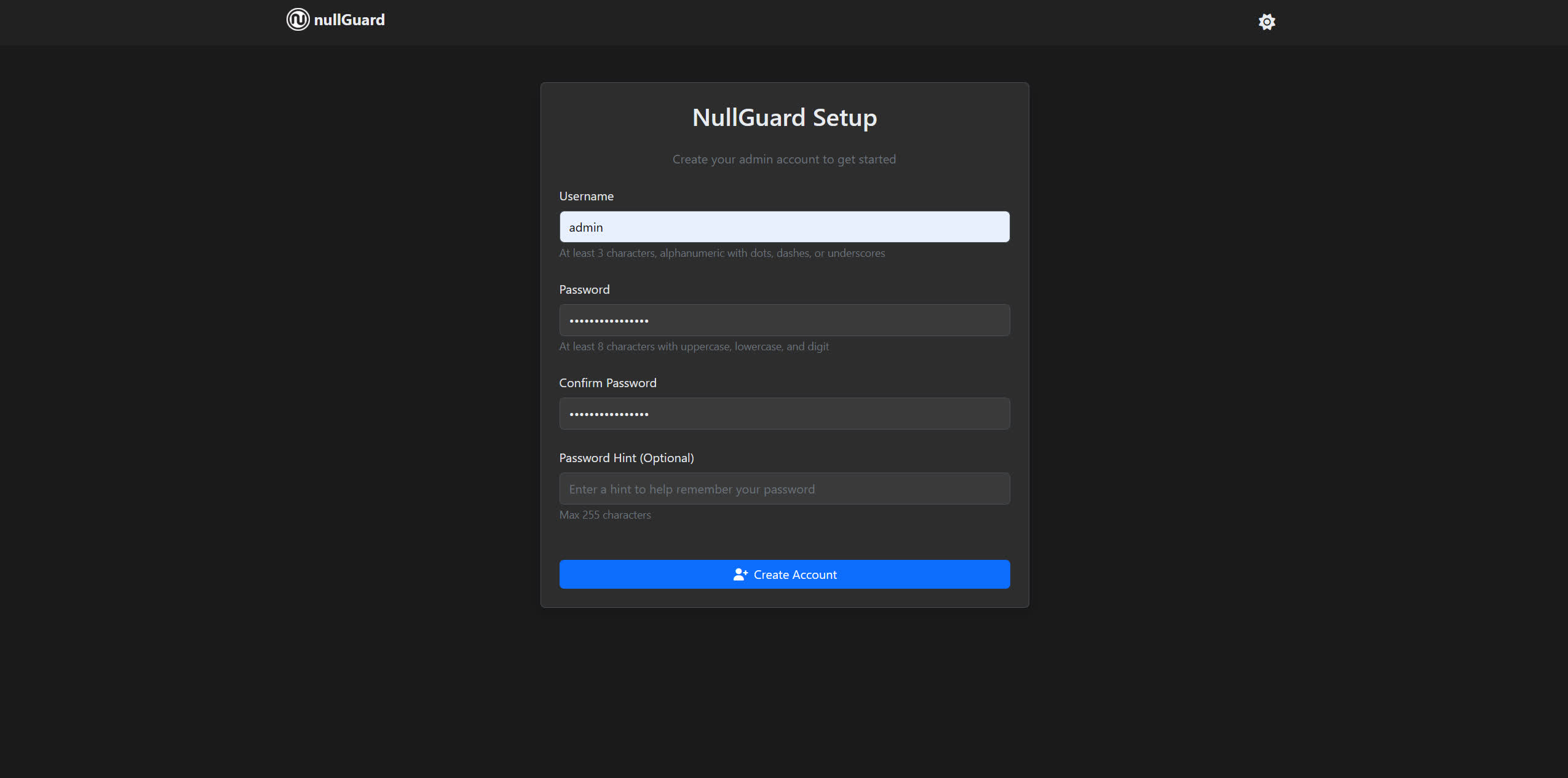
Pick a password, submit, and you're in. This only runs once - after that the setup route is disabled.
⚠️ NOTE: ⚠️ nullGuard will attempt to automatically detect your public IP address for your clients to connect to:
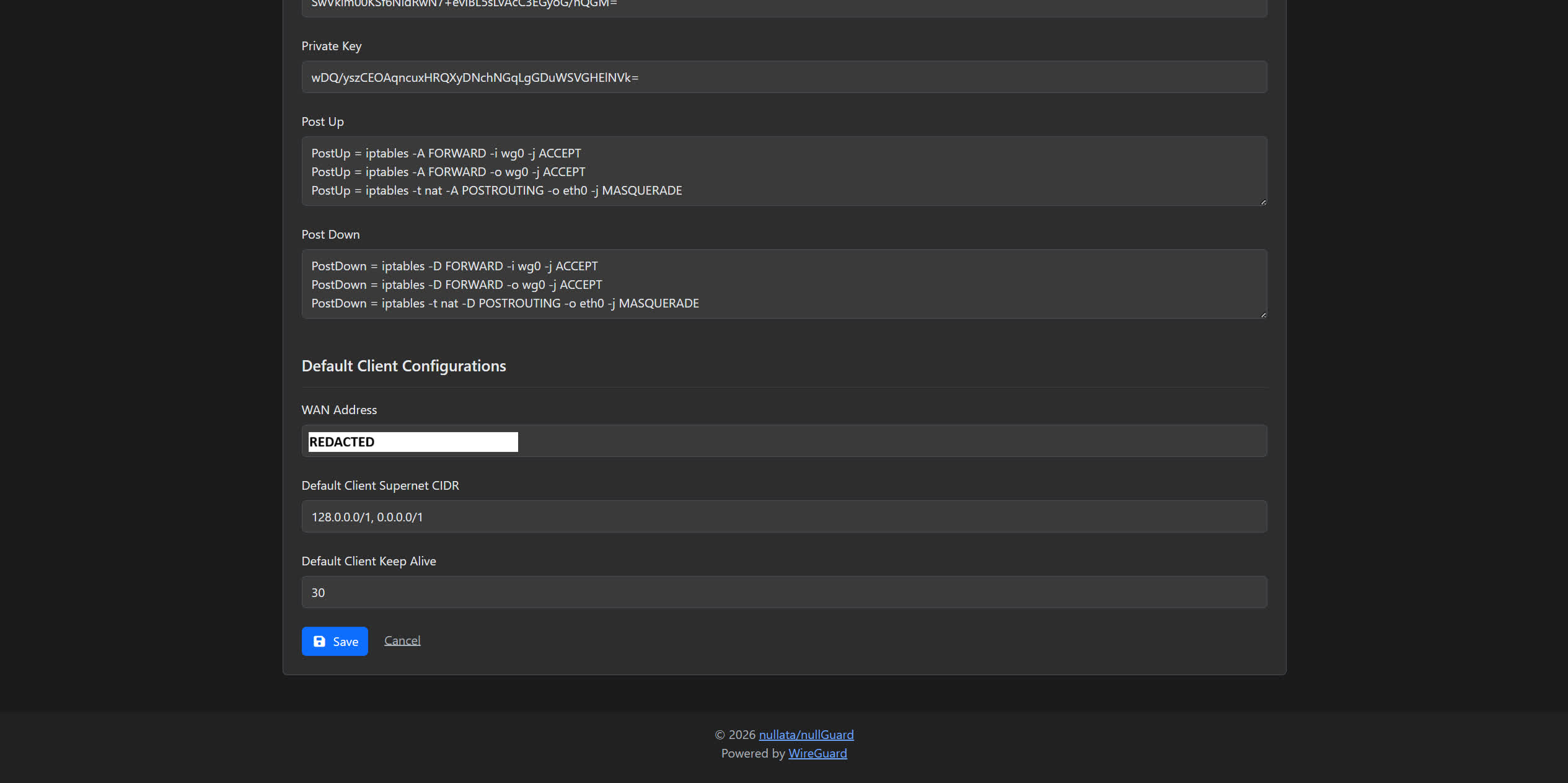
Step 2 - Create a server.
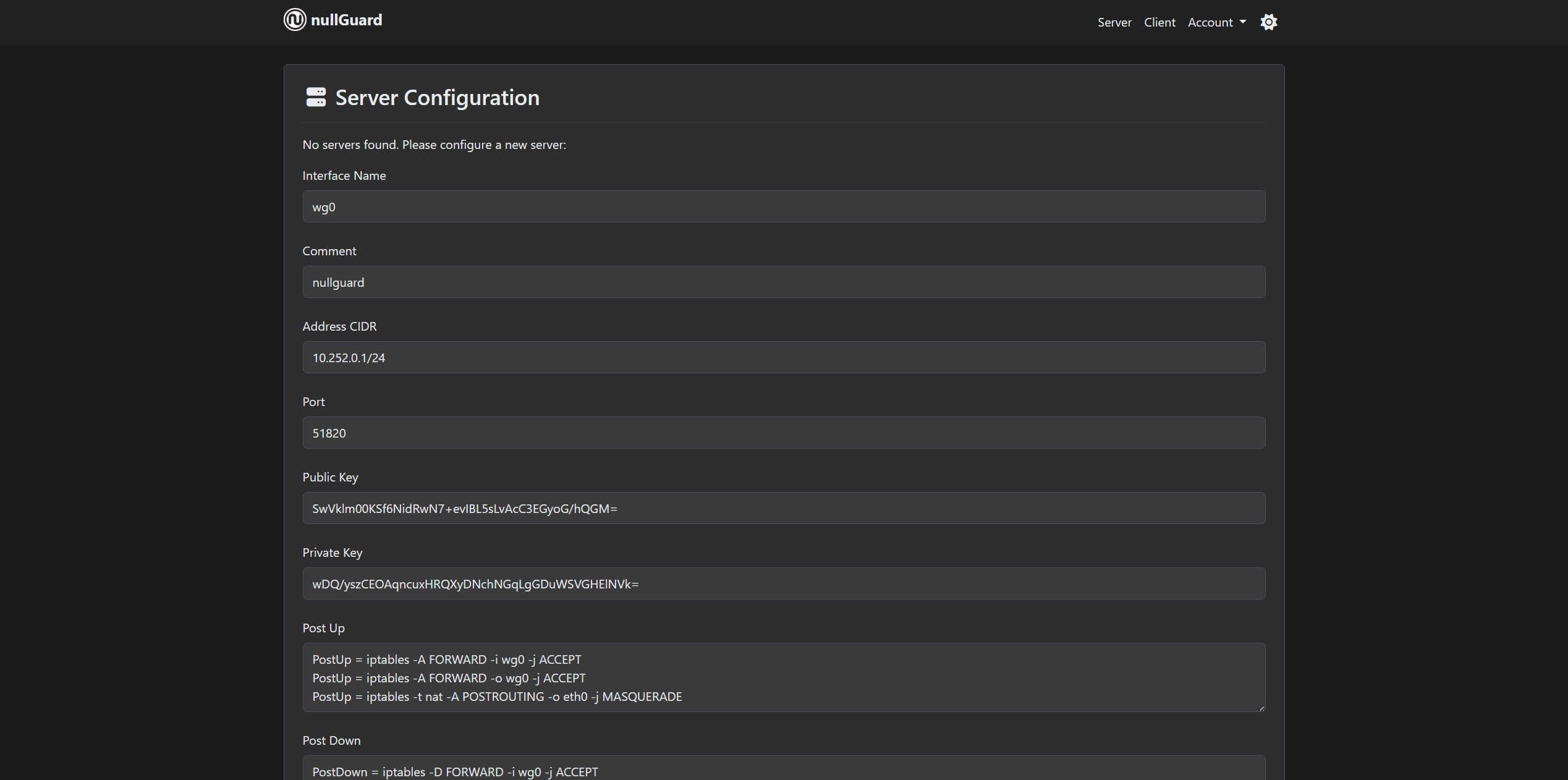
Everything gets auto-filled in, but you can also make changes depending on what your deployment configuration preferences are:
- Interface name -
wg0is fine unless you're running multiple servers (thenwg1,wg2, etc.) - Address - the VPN subnet.
10.0.0.1/24gives you 254 client slots and won't clash with most home networks. - Port -
51820is the WireGuard default. Match whatever you forwarded on your router or opened in your firewall. - WAN address - your server's public IP or domain name. This is what clients use to reach the server from outside.
Keys are auto-generated. Hit create.
Step 3 - Start the server.
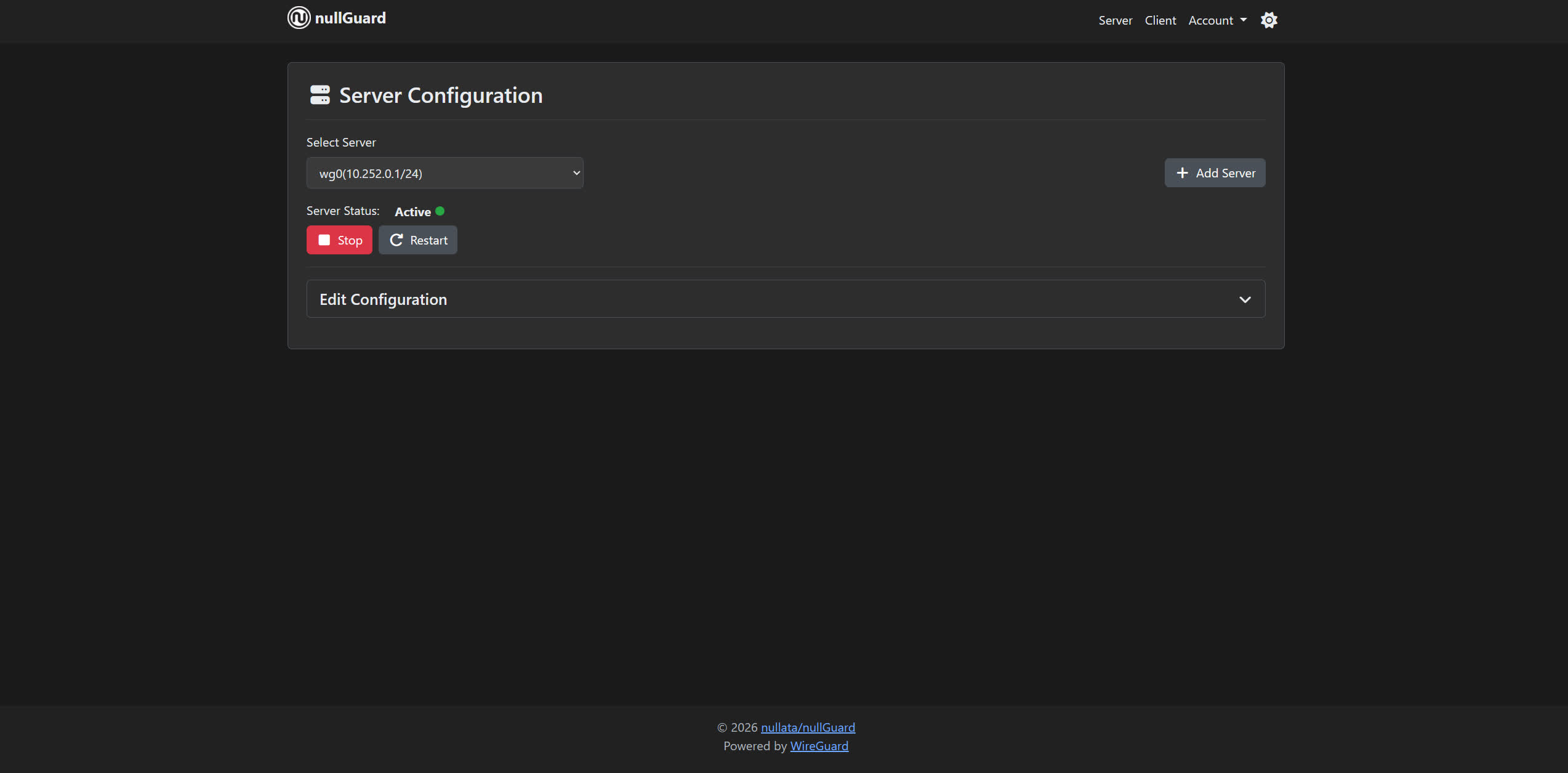
One button. The server comes up, the WireGuard interface is created, and you'll see the status flip to running.
Step 4 - Create a client.
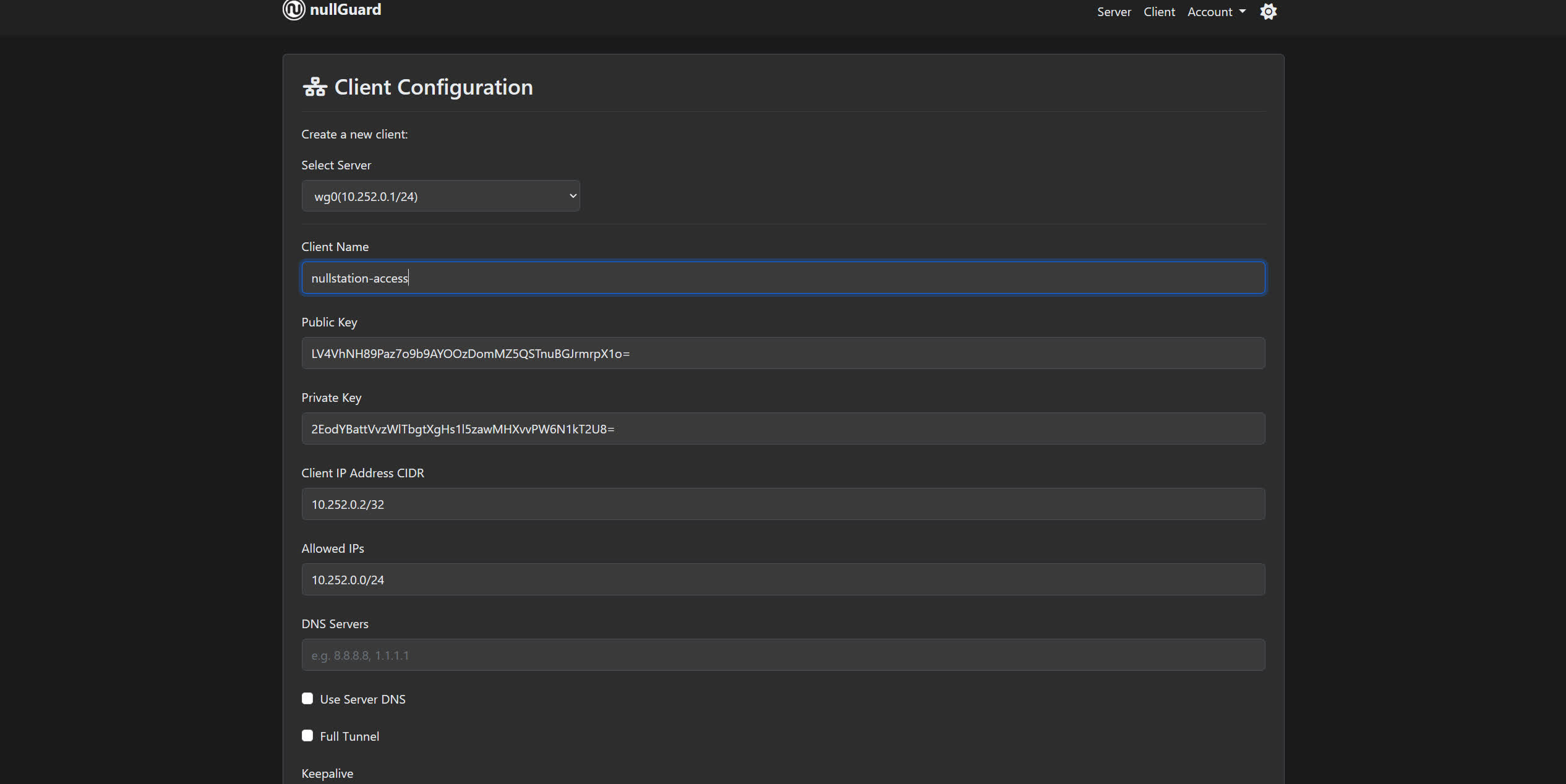
Give it a name - "my-laptop", "phone", whatever. Everything else is handled: key pair generated, next available IP assigned, config built. Hit create.
Step 5 - Grab the config or scan the QR code.
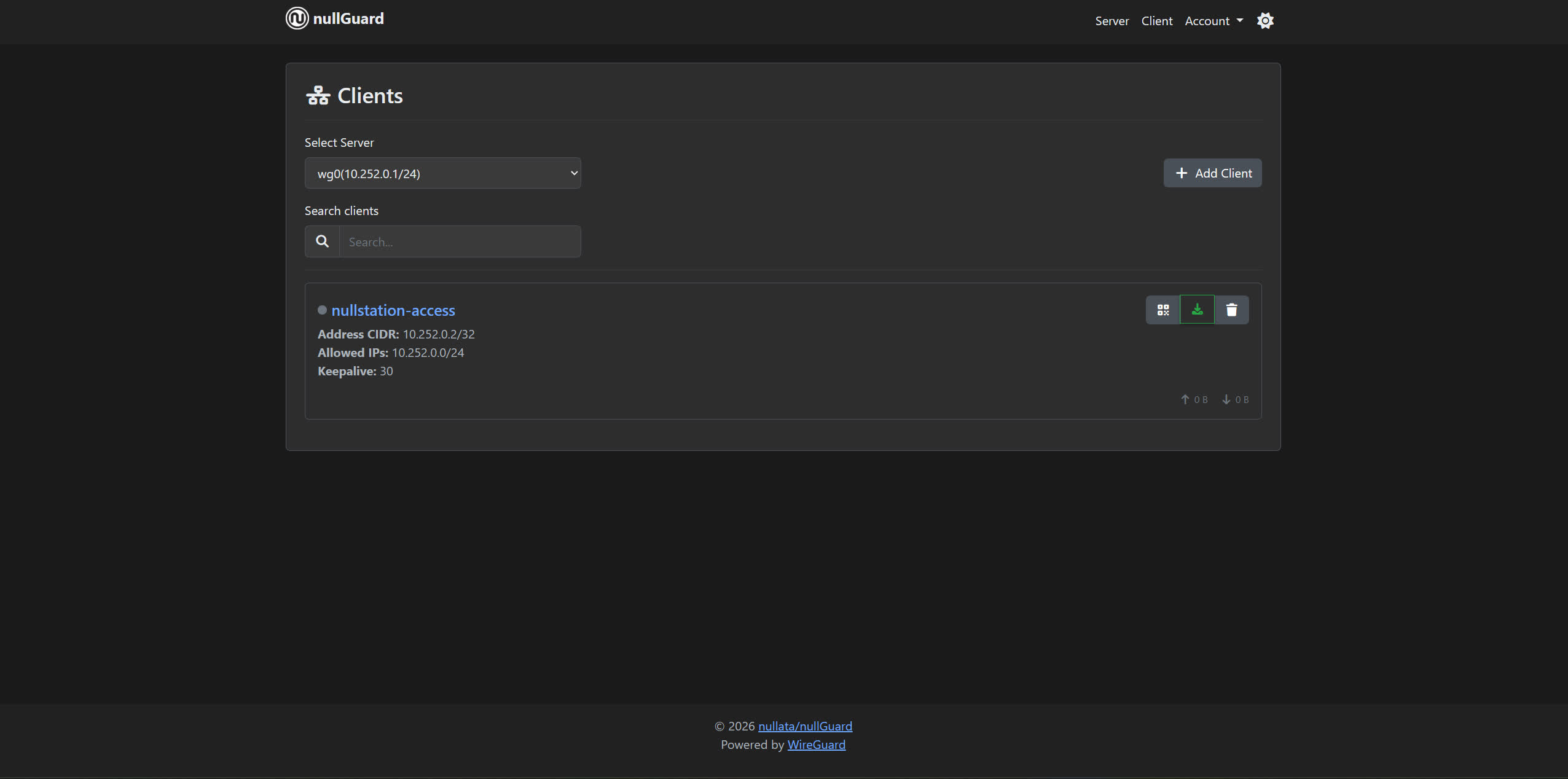
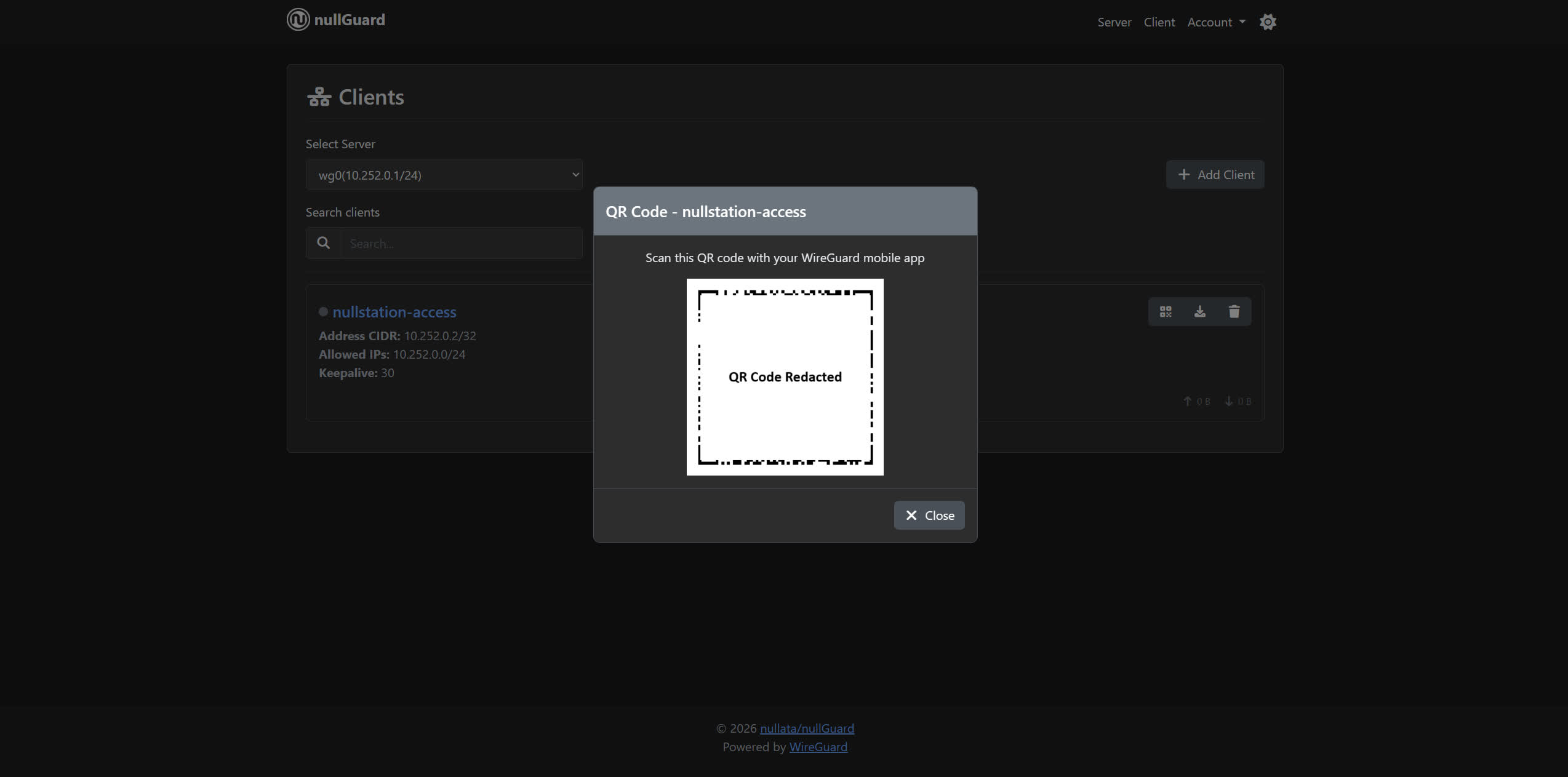
For a phone, scan the QR code directly from the WireGuard app. For a laptop or desktop, download the config file and import it. Done. That client is now ready to connect.
Step 6 - Restart the server.
New clients need a server restart before they can connect - this applies the updated peer list to the active interface. Same one-button deal as starting it.
Add another client - same process, repeat from step 4. Each one gets its own IP in the subnet automatically.
Revoke a client - delete it from the UI, restart the server.
That's the entire lifecycle.
Step 7 - Connect your client
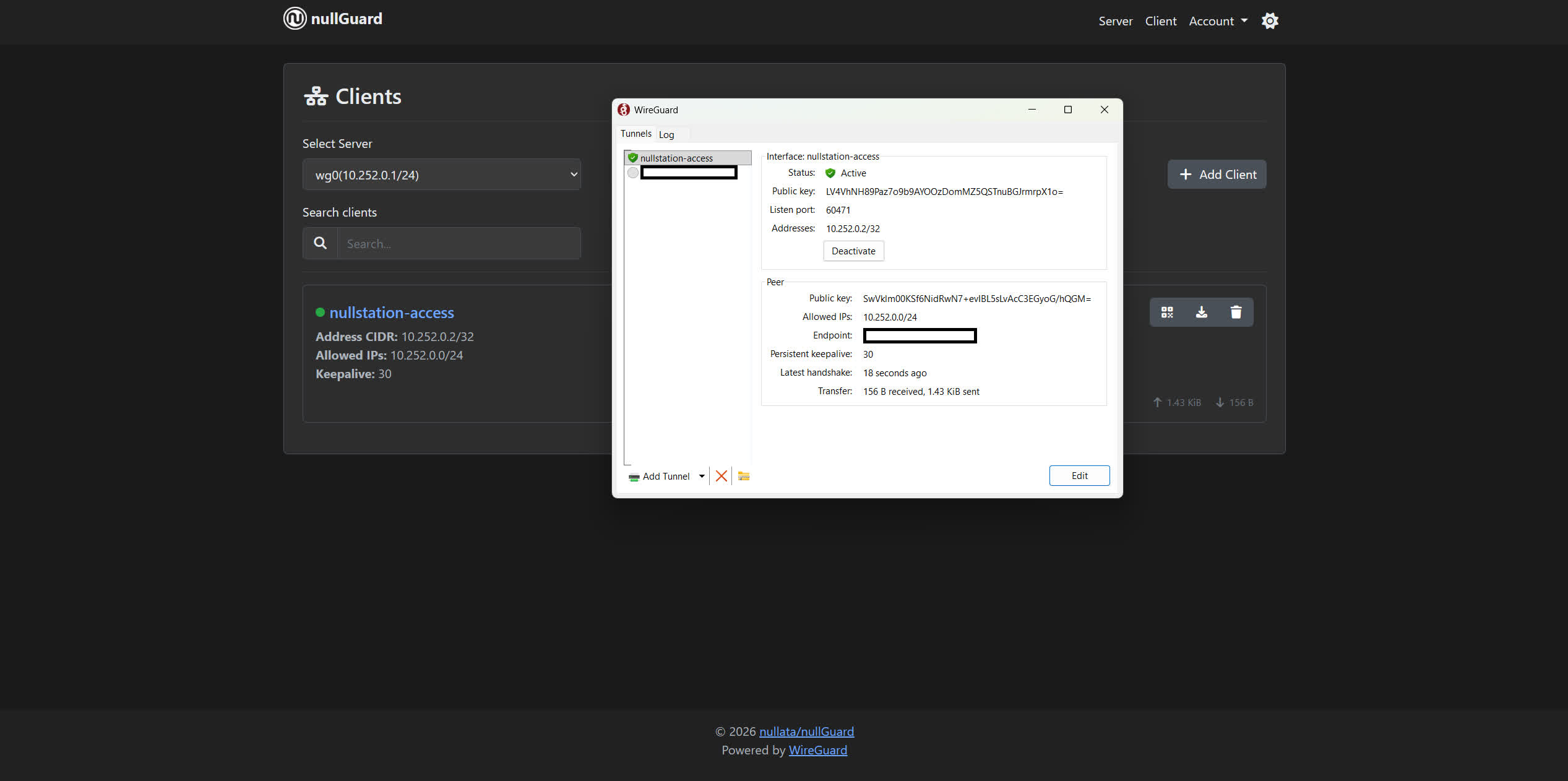
Voila!
Full Tunnel vs Split Tunnel ⚠️
When you create a client, there's a choice that's easy to miss but significantly affects behavior: what traffic actually goes through the VPN.
This is controlled by the AllowedIPs field in the client config. nullGuard lets you set this per-client.
Full tunnel routes everything through the VPN. The client config gets AllowedIPs = 0.0.0.0/0, ::/0 - which means "all IPv4 and IPv6 traffic." Every packet your device sends goes through the WireGuard server. Your effective IP on the internet becomes the server's IP. This is what you want for the exit-node/privacy use case.
Split tunnel routes only specific traffic through the VPN. Typically this means just the VPN subnet itself - something like AllowedIPs = 10.0.0.0/24. Your normal internet traffic still goes through your regular connection; only traffic destined for other devices on the VPN (or your home network behind it) goes through the tunnel. This is what you want for the remote-access use case - you can reach your home server while still having your local internet work normally.
Pick based on what you're actually trying to do.
The API
Everything the UI can do, the API can do too. Useful if you're scripting client provisioning for a team or integrating with something else.
Create an API token from Admin Settings, then:
# Create a server
curl -X POST http://localhost:8080/api/v1/create-server \
  -H "Authorization: Bearer <token>" \
  -H "Content-Type: application/json" \
  -d '{
    "interfaceName": "wg0",
    "address": "10.0.0.1/24",
    "port": 51820,
    "wanAddress": "vpn.example.com"
  }'

# Add a client (minimal - everything else is auto-generated)
curl -X POST http://localhost:8080/api/v1/create-client \
  -H "Authorization: Bearer <token>" \
  -H "Content-Type: application/json" \
  -d '{"serverId": 1, "name": "my-laptop"}'
The create-client response includes the full WireGuard config in the data.config field, ready to write to a file or pipe wherever you need it.
Full API reference is in the README.
What It Doesn't Do (Yet)
This is not a full network management suite.
It manages WireGuard configurations - servers and peers. It doesn't do traffic analytics, it doesn't have a built-in DDNS client, it doesn't manage firewall rules beyond the PostUp/PostDown fields you configure yourself. It's also designed to run on your internal network behind a firewall or reverse proxy - not to be the thing you expose naked to the internet.
The Bigger Picture
Look - the pressure on VPNs isn't going away. The UK legislation, the US state-level bills, the pattern of governments building their own "privacy" tools while restricting independent ones - this is directional. The trajectory is toward a world where using a commercial VPN is either legally restricted or has enough friction attached to it that most people stop.
Self-hosting removes you from that calculus. The governments currently going after VPNs are targeting VPN services - companies with a product, a customer base, a billing relationship to trace. A WireGuard server running on a VPS you control isn't that. You're not a company selling VPN services. You're running a network interface on hardware you pay for. The config files live in your database. There's no provider to subpoena.
Regulating individual self-hosted WireGuard instances is a much harder problem than sending a cease-and-desist to a VPN company. They haven't caught up to that yet.
The honest trade-off worth naming: a commercial VPN is essentially a fleet of VPS nodes spread across the planet that the company operates on your behalf. You get a server picker, dozens of countries, and you pay one flat monthly fee to access all of it. One self-hosted VPS gives you one exit location. If you want multiple geographic exit points - one in Germany, one in the US, one in Singapore - that's multiple VPS instances at multiple monthly bills, which adds up fast and will eventually cost more than just buying a commercial VPN subscription. That math only works in your favor if you have a group of people splitting the infrastructure between them - a few friends or a small team chipping in on a couple of VPS nodes is both cheaper per person and gives everyone an exit point they actually control.
For most solo use cases the single-location trade-off is fine, because the goal is privacy from your ISP and ISP-adjacent surveillance, not geo-hopping for streaming. But it's worth being clear-eyed about it upfront: this is not a drop-in replacement for a commercial VPN with a server picker, and pretending otherwise would be dishonest.
The self-hosting instinct - running your own Discord-like server, your own media stack, your own VPN - is increasingly the correct response to a world where the centralised versions of these things are either compromised by commercial interests or being handed the legislative tools to become less private by design.
nullGuard is just trying to make the VPN part of that less annoying than it has been.
- GitHub: github.com/nullata/nullguard
- Docker Hub: hub.docker.com/r/nullata/nullguard
Licensed under the Elastic License 2.0.
Interested in a follow-up covering self-hosted OpenVPN - when it actually makes sense, and how to set it up? Subscribe to the mailing list to stay up to date with future articles.
If you want to support this project, subscribing to the YouTube channel goes a long way.
Live long and prosper. 🖖👽
Join the conversation
Like & Comment on